Unit 5.5: Text Files
Topics covered in this unit
After completing this unit you will:
- know how to use a
Scannerobject to read from aFilereference to an external text file on your computer - know how use a
ScannerandFileto write to an external text file
5.5.0. Overview
One common way of storing information digitally is in a text-file format: characters arranged in lines of text. The names of these files often have a short extension such as txt or csv identifying them as text files, although other extensions exist as well. If you use BlueJ to manage your projects for this class, you maybe have noticed that your projects are automatically created with a file called README.TXT. This is a text file, sometimes called a plaintext file, that can be read by any text editor.
Like most programming languages, Java allows you to read information from a text file for use in a program, and to write information to a text file for storage. This can be convenient if you wish to store the output from a program's calculations, for example. Or perhaps you have a game, and you want to keep track of the highest score ever achieved. The game program can save high scores into the text file while it's running and retrieve those scores the next time the game is run.
This is a short but useful unit that will show you exactly how this process works.
Let's get started.
5.5.1. Loops for input
Take a look at this program, which lets the user enter text until a "sentinel value" of -1 is entered. At that point, the average of all the numbers entered is given.
import java.util.Scanner;

public class WhileInputDemo
{
    public static void main(String[] args)
    {
        Scanner in = new Scanner(System.in);
        int sum = 0;
        int count = 0;
        System.out.print("Enter a number (-1 to stop): ");
        int value = in.nextInt();
        while (value != -1)
        {
            sum += value;
            count++;
            System.out.print("Enter another number (-1 to stop): ");
            value = in.nextInt();
        }
        System.out.println("Thanks!");
        if (count == 0)
        {
            System.out.println("You didn't enter any numbers so I can't give you the average.");
        }
        else
        {
            System.out.println("The average of your numbers was " + ((double) sum / count));
        }
    }
}
This works just fine as written.
It's more often the case, however, that we want to work with a series of values that aren't being entered by hand. Instead, they're stored in a text file.
Text files
Text files are files on your computer that are made of "plain text," simple representations of characters that don't include any information about font, size, style, color, etc. The letter "A" is just an A.
How do we average those numbers?
5.5.2. Reading from a text file
We can use a Scanner object to read from a file stored on the computer, sometimes called an "external file" because it's external to the program code. To do this, we'll need to create a File object that the Scanner can use.
When you're ready to start programming a Scanner to use with a text file, you'll want to keep these two parts of the College Board's "Java Quick Reference" handy.
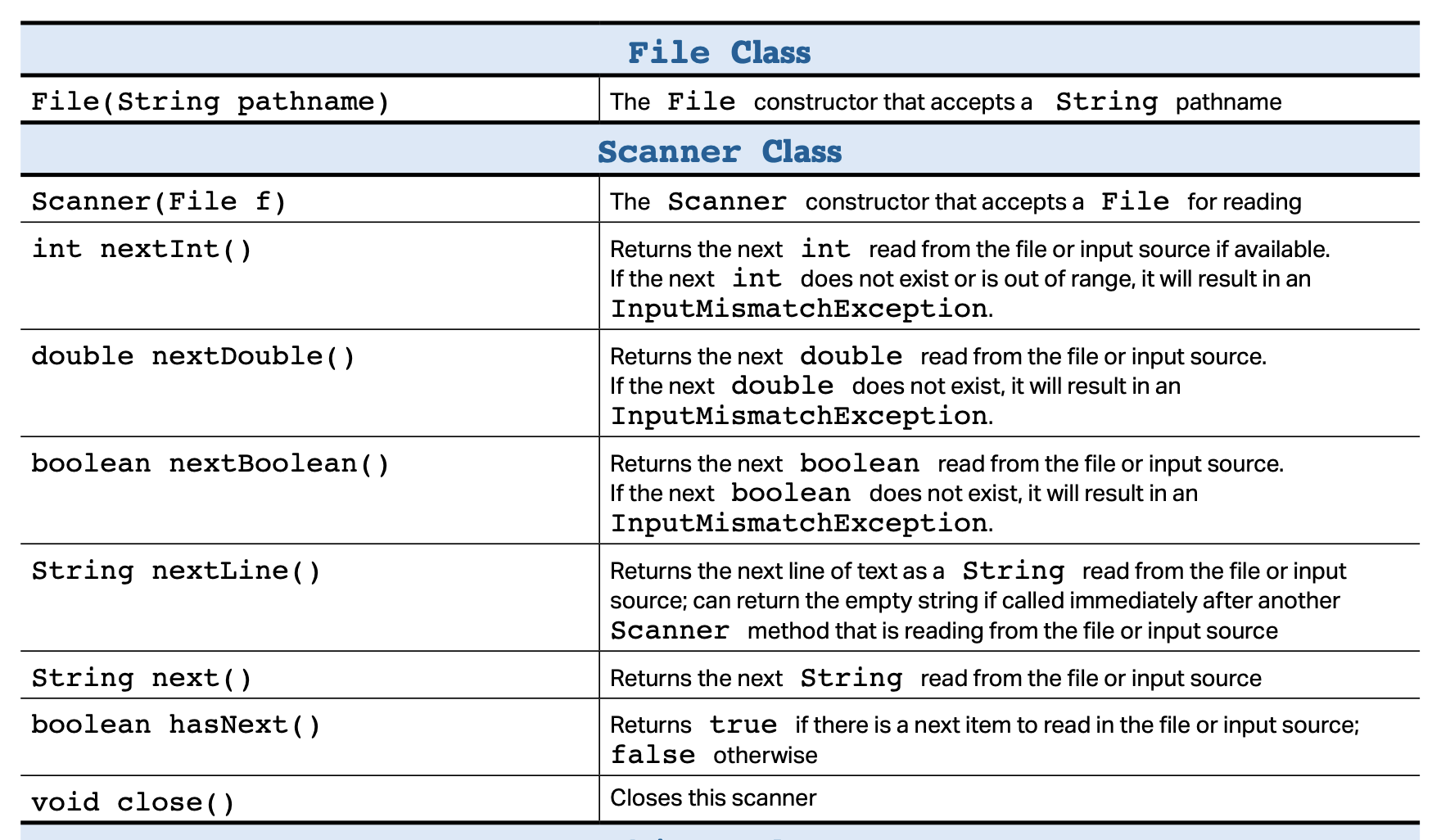
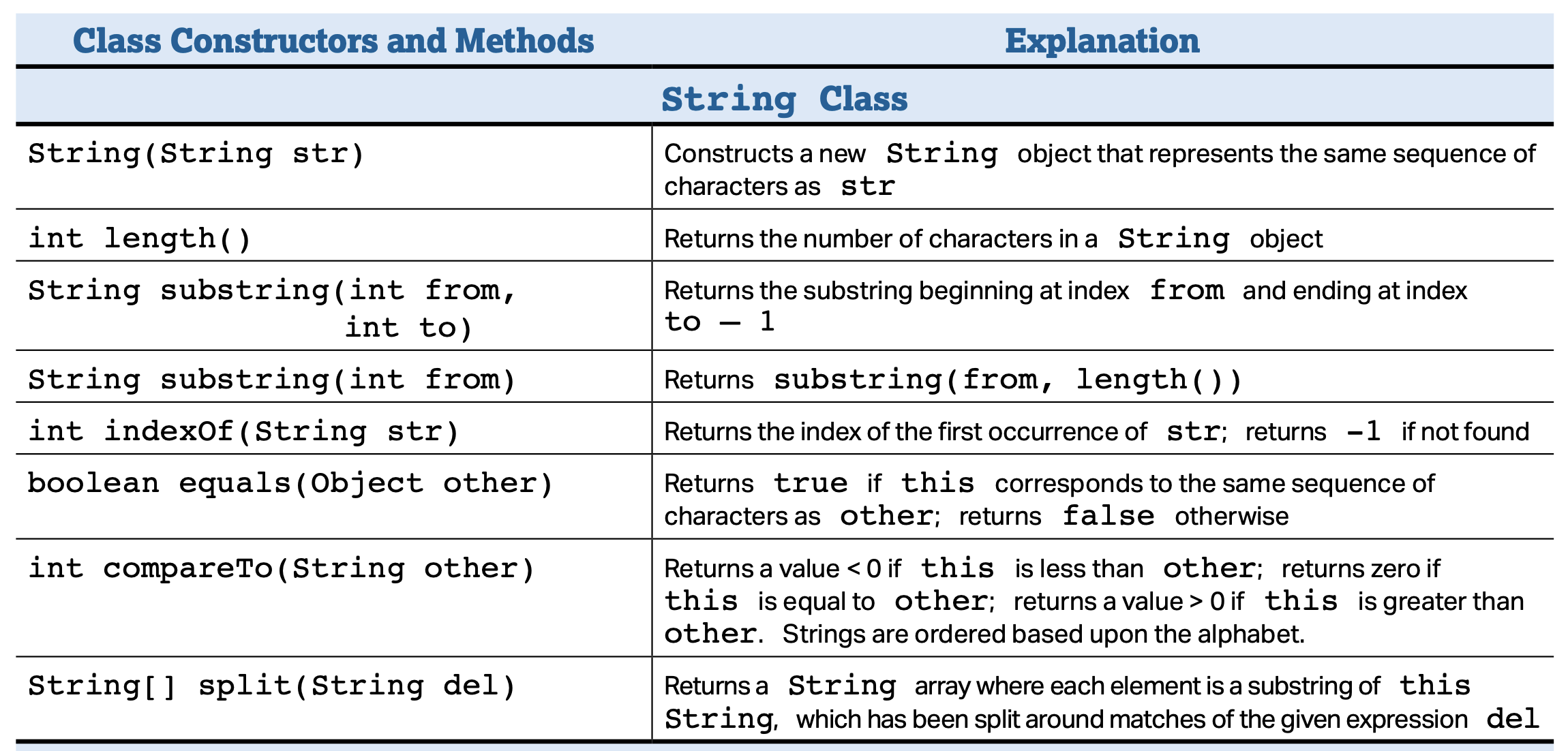
Here's an example of opening up a text file, using a Scanner to read through it, and printing out the sum of those values.
Use the documentation in the code to figure out how everything works.
Using a Scanner and File to access an external file
The program we're going to run will add together all the values in a data file called values.txt. We'll have one value per line:
12
23
34
45
56
You can create a file like this using a text editor. The file that we're working on, for our examples, will need to be located in the same directory (folder) as the program we're running so it can find it.
Here's a main method in Java that will open the text file, read in the numbers, add them, and print out the sum.
Again, use the comments in the code to understand what's going on.
/**
 * Demo reading from an external file
 *
 * @author Richard White
 * @version 2024-08-11
 */

import java.util.Scanner;   // So we can receive a series of inputs
                            // from System.in (standard input) and
                            // a File object
import java.io.File;        // Allows us to reference a file of data
                            // stored on the computer.
import java.io.IOException;
                            // An error catching library that we have
                            // to reference so we know how to handle
                            // issues if the external file isn't found.


public class SumValues
{
    public static void main(String[] args) throws IOException
    {
        Scanner in = new Scanner(System.in);        // Reads standard (keyboard) input
        System.out.println("Enter the name of the textfile containing a series of integers,");
        System.out.println("one integer per line. This file should be in the same directory");
        System.out.println("as the program.");
        System.out.print("Filename: ");
        String inputFile = in.next();
        in.close();                                 // Close out the Scanner file

        File inFile = new File(inputFile);          // creates a file object that can use to read
        Scanner diskReader = new Scanner(inFile);   // Different Scanner from before!

        int sum = 0;
        while (diskReader.hasNext())             // while we still have data to read in...
        {
            int value = diskReader.nextInt();       // read in an integer
            System.out.println("Adding the value " + value);    // inform the user
            sum += value;                           // add the integer to our running sum
        }

        System.out.println("The sum of these values is: " + sum);
        diskReader.close();                         // close the diskReader Scanner
    }
}
Output from run:
Enter the name of the textfile containing a series of integers,
one integer per line. This file should be in the same directory
as the program.
Filename: values.txt
Adding the value 12
Adding the value 23
Adding the value 34
Adding the value 45
Adding the value 56
The sum of these values is: 170
Reading data in from an external file is an incredibly useful strategy, particularly where large amounts of data are involved.
Keep in mind that "large amounts of data" may produce large values, which introduces the possibility of overflow errors. If you're working with int values, you may want to consider using long variables, or even learn about the BigInteger class.
5.5.3. Reading lines and splitting
If more than one piece of data is located on each line of a file, those data are often separated by commas or spaces. If separated by commas, a text file containing such data is often called a CSV file, for "comma-separated-values."
In a comma-separated file one typically wants to separate the data fields into their individual values. For this, the String method split() is useful.
The split() method
The split() method takes a String value as an explicit parameter, and uses this as a delimiter to split its implicit parameter up into a String array of values.
So, to separate a comma-separated line into individual values:
String line = "Richard White,rwhite@polytechnic.org,626-297-1011";
String[] result = line.split(",");  // Take line and separate by commas
for (int i = 0; i < result.length; i++)
{
    System.out.println(result[i]);
}
// Produces the output:
// Richard White
// rwhite@polytechnic.org
// 626-297-1011
What if we have a data file with multiple words on each line of the file, separated by spaces? How would we write a program to
- read the lines in from the external file
- split each line into individual words
- calculate the average length of all the words in the file?